The AI is not the asset. These are.
Five documents about your household. An AI reads your calendars and the school inbox, writes the week, and hands it to you. You are the check, and there is nothing to install.
Tested end to end in Claude, including reading a Google Family calendar and a subscribed school calendar. The documents are plain words, so they carry to ChatGPT, with one thing to check first.
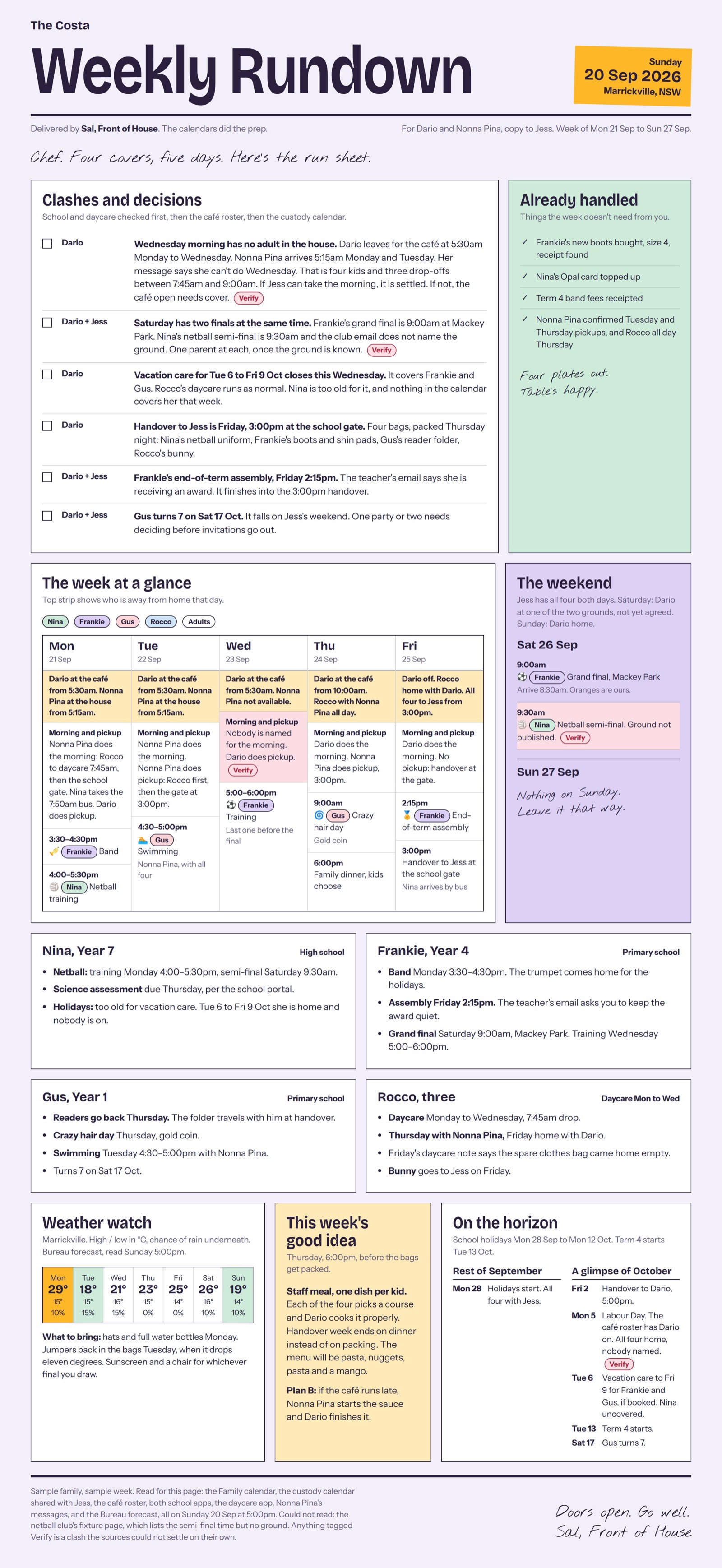
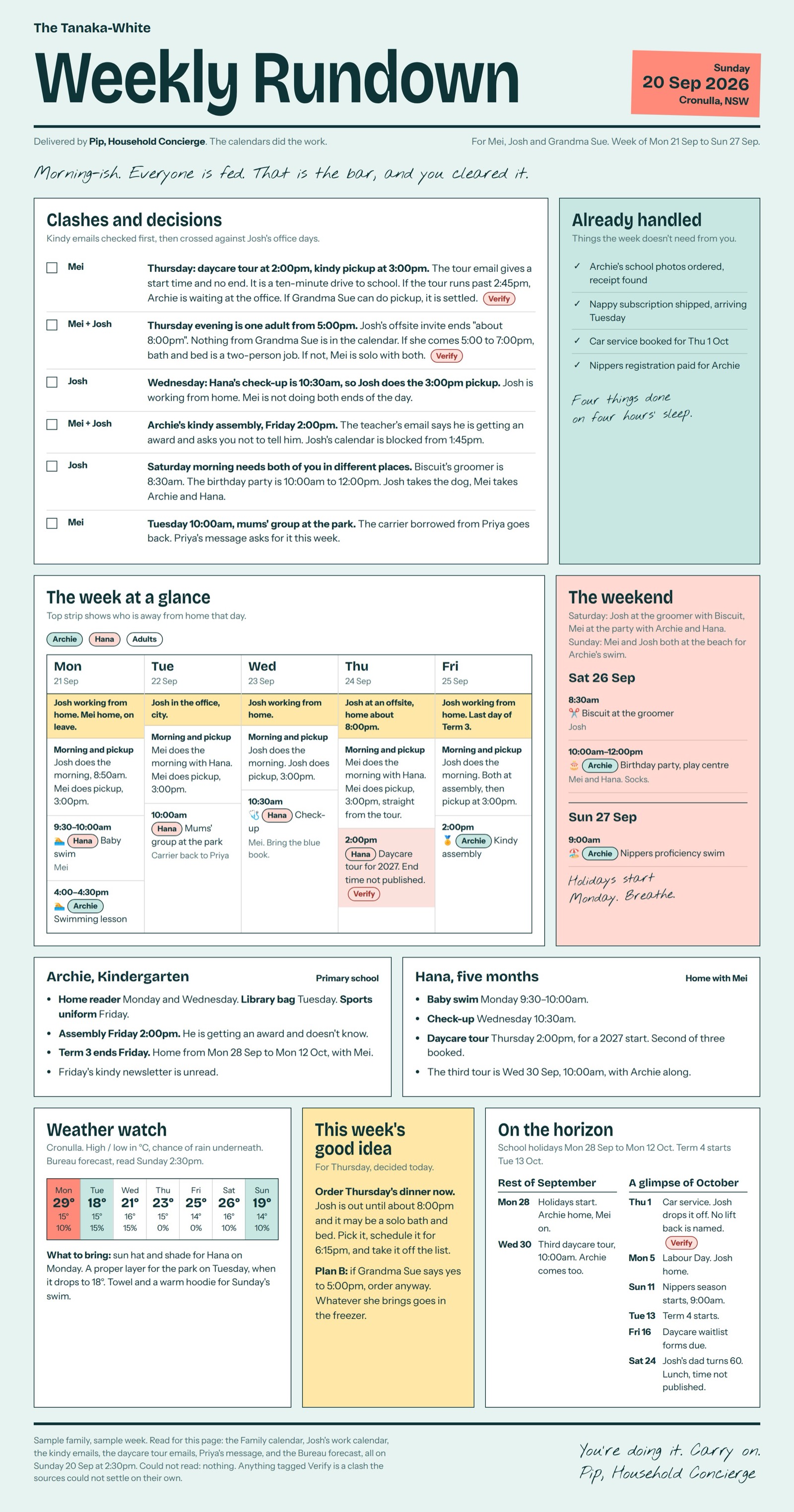
Made-up families, not my house. Click through four sample families (opens in a new tab): a shift worker on nights, separated parents with a Friday handover, four kids and a café.
Why documents
I have swapped the model underneath my Sunday system twice. Each time the system got better at the same job, because the job was written down in five files and the model was only the thing reading them.
Swap the files and you have a different system. Swap the model and you have the same system, slightly sharper. So this is the part worth your afternoon.
Set up the calendars and the label
20 minutes. Do this one on a computer.The system can only read what exists. Before the interview you need three things: a family calendar the other adults can see, the school's calendar showing inside yours if the school lets it out, and a Gmail label that catches the school emails. If you already have them, this takes five minutes and only checks they are set up right.
Use a Google Family group. It is what I did, and it was far easier than building a shared calendar by hand: make the group and a calendar called Family appears for everyone in it. People who do not belong in the group, like a nanny, a grandparent or the other parent in a separate household, can be given the Family calendar on its own. The prompt asks about each person.
The school calendar is the unknown. Some schools publish a link you can subscribe to. Some keep it inside an app, or only in a PDF. The prompt helps you find out which you have, connects it if it can be connected, and tells you plainly if it cannot. Nothing here needs code, so if it cannot be subscribed to, your dates come from the school emails.
Paste this into an ordinary Claude or ChatGPT chat. It walks you through one click at a time, waits for you, and finishes by handing you a short block called SETUP SUMMARY. Keep it. The interview asks for it.
Read it before you paste it
I am setting up a weekly family message that an AI will write from my calendar
and my school emails. Before that can work I need four things in place, and I
want you to walk me through them. I am not technical.

1. A Google Family group and its Family calendar, which the other adults in my
   house can see and add to.
2. My school's calendar showing inside my Google Calendar, if the school
   publishes one that can be subscribed to.
3. A label in Gmail that catches the school emails (and the club, the
   childminder, whoever sends me dates and bills), so that is where you look.
4. A decision on weather: whether you should look up my local forecast each
   week, and for which town.

HOW I WANT YOU TO WORK WITH ME

- First ask what I am on, phone or computer. Some of this can only be done in
  a browser on a computer. If that is true for a step, tell me before I start
  it, not halfway through.
- Look up Google's current help pages before giving me steps. Menus move. Do
  not describe a button from memory.
- One step at a time. Tell me what to click, then wait for me to say done. Do
  not give me a long list of future instructions.
- If I say I cannot see it, ask what I can see, or ask for a screenshot. Do not
  repeat the same instruction.
- Ask before you assume. I may already have a Google Family group, a Family
  calendar, a school calendar or a school label. If I do, check it is set up
  right rather than making a second one.

GOOGLE FAMILY AND THE FAMILY CALENDAR

- First check whether I already belong to a Google Family group. If I do, look
  at what is already there before creating anything.
- If I do not, help me create one using Google's current Family setup. Before
  I invite anyone, look up and tell me in plain words what joining a Family
  group involves for them: how many people it holds, anything else it shares
  besides the calendar, and any limit on leaving or switching groups.
- Use Google's own Family calendar as the starting point. Do not create a
  separate calendar with our family name if the Family calendar is available.
- Ask me who needs to see the calendar, one person at a time, and for each one
  ask whether they belong in the Family group or only need the calendar. A
  partner usually belongs in the group. A nanny, an au pair, a grandparent, or
  the other parent in a separate household may not: they may already be in
  their own Family group, or it may simply be the wrong relationship. For
  those people, look up how to share the Family calendar with someone outside
  the group, and do that instead.
- Explain who will have access to the Family calendar and what each of them
  can do: see, add, change, delete. If the adults need different levels of
  access, explain the options before changing anything.
- Check the Family calendar exists and is visible in my Google Calendar.

THE SCHOOL CALENDAR

- Ask me which schools, daycares or clubs publish dates, one at a time.
- Do not assume how they publish. Help me find out which of these it is:
    a link I can subscribe to (it often says "subscribe", "iCal", "ICS" or
    "add to calendar", or the link starts with webcal or ends in .ics)
    a Google calendar with an add button
    a school app that holds the calendar and does not let it out
    a PDF or a page on the website, and nothing else
- If I find a link, ask me to paste it and tell me whether it looks like one I
  can subscribe to. A school's public calendar link is fine to paste. Never
  ask me to paste the private or "secret" address of my own calendar.
- If it can be subscribed to, walk me through adding it to Google Calendar by
  its link. Tell me beforehand that Google updates subscribed calendars slowly,
  so a change at the school can take a day or so to reach me.
- If it cannot be subscribed to, say so plainly and do not invent a workaround
  that needs code. Tell me my choices: rely on the school emails under my
  label for dates, or add each term's key dates to the Family calendar by hand
  once a term. Ask which I want.

GMAIL LABEL AND FILTER

- First check whether I already have a suitable label. If I do, use it.
- Otherwise help me make one, then make a filter so new mail from those
  senders is labelled on its own.
- Ask me who the senders are before creating the filter. If I do not know the
  addresses, show me how to find them from an email I already have.
- Make sure the filter catches those senders without catching unrelated mail.
- Apply the filter to the last month of existing mail so the first run has
  something to read.
- Be honest about what the label does. Once Gmail is connected you are
  technically able to search my whole mailbox. The label is how I tell you
  where to look, and looking nowhere else is a rule you follow, not a lock.
  Tell me that plainly and let me decide whether I am comfortable with it.

WEATHER

Ask me: do you want me to look up the local weather each week, yes or no? If
yes, which town? Nothing needs to be set up for weather.

CONNECTING GOOGLE TO THIS APP

- When the calendars and the label are ready, walk me through connecting
  Google Calendar and Gmail in this app's settings. Look up this app's current
  instructions first.
- Never ask me to paste a password, a verification code, an API key or any
  other secret into this chat. If a step needs one, tell me it happens on
  Google's own sign-in screen and let me do it there.
- If the connection asks me to choose what to share, explain what is being
  requested before I approve it.

TEST EVERYTHING

Once connected, read back only these, and nothing else:

- The next three events on the Family calendar.
- The next three events on the school calendar, if I subscribed to one.
- The subject lines of the three newest emails under the label.

If any of them comes back empty or wrong, stop and help me fix it before we
go on. If you can see the Family calendar but not the school one, tell me
that plainly, because it changes what goes in my sources.

SETUP SUMMARY

At the end, give me one short block headed SETUP SUMMARY that I can copy:

- Exact name of the Family calendar
- Who is in the Google Family group, and who the calendar is shared with
  outside it
- School calendar: its exact name as it shows in Google Calendar, or "none,
  dates come from email" or "none, added by hand each term"
- Whether you could read each calendar in the test
- Exact name of the Gmail label
- Senders the filter catches
- Weather: yes or no, and the town

I will paste that block into the interview when it asks about sources.
What the label does, honestly. Once you connect Gmail, the AI is able to search your whole mailbox. The label is how you tell it where to look, and looking nowhere else is a rule it follows, not a lock. That rule is written into your documents twice, and you read every message before it goes anywhere. Decide with that in mind.
Weather is a yes or a no. If you say yes, the forecast for your town becomes a named source like any other, looked up with the app's own web search. If you say no, weather is left out completely rather than estimated. A forecast nobody looked up is an invented fact, and it is the one invented fact you would actually act on.
Get the five written
About an hour. The first two are the work. The other three are mostly choosing.- household.mdWho is in the house, the usual week, how "away" is marked.Turns a calendar readout into a briefing that knows nobody has Wednesday's pickup.
- sources.mdExactly what may be read, and who receives the result.The trust document. If it is not named here, the run does not go looking for it.
- rules.mdThe judgment. What always goes in, what never does.The file that grows. Every line is a mistake that cannot happen twice.
- voice.mdThe register, the greeting, the sign-off, where a joke may go.An unread message is worse than no message.
- digest-template.mdThe shape of the summary, and whether you want the page as well.The summary is what the family reads. Everything else is archive.
You do not need to finish them to start. A half-filled rules.md with three lines in it works on the first Sunday, and that is how it is supposed to go, because the rest of the lines get written by being wrong.
The easy way: be interviewed
Paste one prompt into an ordinary chat and it will interview you about your household and write all five, as five files to download. Have your SETUP SUMMARY ready.
Do this in a normal chat, not in the project. Only finished documents go in the project, because a document with blanks still in it makes the system invent things to fill the gaps. Anything you do not know yet gets written as NOT SET, with a line saying what to report instead of guessing.
Read it before you paste it
I want a weekly message that tells my household what is coming up: who is out,
who does drop-off and pickup, what is on, and anything that needs money or a
form. I will run it myself in this app every Sunday. There is no code and
nothing to install.

Before you write anything, interview me. Ask a few questions at a time, never
thirty. Assume no technical background and explain any word you would not say
out loud to a friend.

I need five documents at the end:

1. household.md         Who lives here, what each person is called in the
                        message, the usual week, who normally does drop-off and
                        pickup, what is standing, and what flexes.
2. sources.md           Which calendars may be read, each by its exact name,
                        which mail label may be read, whether you may look up
                        my local weather, my time zone, and who the week is
                        written for. Nothing outside this file gets read.
3. rules.md             What always goes in and what never does. Start me off
                        with sensible defaults and ask which ones I want changed.
4. voice.md             Who is speaking. Help me pick a character with a real
                        register, or make it plainly an AI. Steer me away from
                        a voice that passes as me, and tell me why: if it reads
                        as though I wrote it, I am answerable for every line.
                        But it is my call.
5. digest-template.md   The shape of the summary you give me in the chat:
                        greeting, week label, what needs money or a form, day
                        by day, one line of what is coming, sign-off. And
                        whether I also want the week as a full page.

How I want you to work with me:

- One document at a time. Interview me for it, write it, show it to me, and
  change whatever I do not like before moving on to the next one.
- For household.md, start by asking me to describe a normal week the way I
  would tell a new babysitter, all in one go. Then ask only about the holes.
  Only ask for things that are not written down anywhere. If I say "it is
  always in the calendar", accept that and move on.
- If I give you a vague answer, ask for the specific version. "Tuesdays are
  messy" is not something a system can follow.
- Facts come from me. Do not invent a name, a time, or a school event to make a
  document look finished. Leave it blank and tell me what is missing.
- When we get to sources.md, ask whether I have a SETUP SUMMARY to paste. If I
  do, use it and only ask about what it does not cover. If I do not, tell me to
  go and do the setup first, because you need the exact names.
- Weather: if my SETUP SUMMARY says yes, name the forecast for that town in
  sources.md as a source you may read. If it says no, leave weather out of the
  result completely rather than estimating it. A forecast neither of us looked
  up is the one invented fact I would actually act on.
- When we get to digest-template.md, tell me there are two ways to get the
  week, and ask whether I want one or both:
    the summary   written here in the chat, short enough to copy into the
                  family group chat
    the page      the whole week on one screen, to print for the fridge or
                  keep open in a browser
  Write my answer at the top of digest-template.md under "Formats". If I want
  the page, ask me three more things and no others: the name for the masthead,
  the place, and one colour. Do not write the page layout yourself. Tell me it
  comes from a sixth document I paste in later.
- Never ask me to paste a password or an account key into this chat. Nothing
  here needs one.

At the end, give me the five documents as five separate files I can download,
named exactly household.md, sources.md, rules.md, voice.md and
digest-template.md. I will upload them to a project, so the names matter. If
this app cannot make files, give me each one in its own copy block with its
file name above it, and tell me how to save each as a plain text file with
that name. Any fact I did not give you is written as NOT SET, with a line
saying what to report instead of guessing.

Start by asking me about my household.
Who it is for. Anyone who gets the week should be able to act on it. People who receive it out of politeness stop reading by week three, and then you have a system that is technically working and practically ignored.
Whether it sounds like you. You decide. But from experience, a weekly rundown that impersonates you makes you answerable for every line in it. This is from an AI. Either have some fun with voice.md, or make it plainly from an AI.
Or fill them in yourself
The same five, blank, are in the templates folder of the download, along with everything else on this page. Replace everything in brackets. The rules are already filled in, because those hold for any household and you only change them once they are wrong for yours.
Read it before you paste it
=== household.md ===

## People
| Name | Role | Called in the message |
|---|---|---|
| [Your name] | [parent] | [first name] |
| [Partner] | [parent] | [first name] |
| [Helper: au pair, nanny, grandparent, neighbour] | [role] | [first name] |
| [Child one] | [year level, school or daycare] | [first name] |
| [Child two] | [year level] | [first name] |

## The usual week
- Drop-off: from [time], usually [who]
- Pickup: [time], usually [who]
- [Day]: [what is different about it]
- Standing activities: [e.g. Tuesday 5pm swimming, both kids]
- [What flexes week to week, and who decides]

## How "away" is marked
- [e.g. an all-day event titled "NAME - OFFICE" means that person is out]

=== sources.md ===

## Read
| Source | Scope | Notes |
|---|---|---|
| [Family calendar] | Mon to Sun, plus all-day events for 4 weeks | [what lives on it] |
| [School calendar] | same | [e.g. already filtered, trust it] |
| [Mail label] | last 7 days | only the senders below |
| [Local forecast for [your town]] | the coming week | only if you want weather. Delete this row and weather is left out |

If it is not in this table, the run does not read it. That includes any
calendar not named here, the rest of the mailbox, and the web.

## How to read the calendars
- Ask for each calendar above BY ITS EXACT NAME. The connection looks at my
  main calendar unless told otherwise. A run that only looked at the main
  calendar, when it is not in the table, has read nothing.
- At the top of every run, state which calendars were actually read and how
  many events each returned. If a named calendar could not be found or
  returned nothing, say so before anything else.
- Times may arrive in UTC. Convert every time to [your time zone, e.g.
  Australia/Sydney] before writing it, and check the conversion did not move
  an event to the wrong day.
- All-day events arrive as dates with no time. Show them as "all day". Never
  give them a time.
- A subscribed school calendar can be 12 to 24 hours behind the school. Say so
  once, where the sources are listed.

## Senders worth a label
- [school office address]
- [school system's no-reply address]
- [the club, the studio, the childminder]

## Who it is for
| Who | How it reaches them |
|---|---|
| [You] | you run it and read it first |
| [Partner] | [you copy the summary into the group chat, or print the page] |
| [Helper] | [same] |

## One home for each fact
- Who is away: [the calendar], not this file
- School events: [the school calendar], never copied by hand
- The usual week: household.md, not the calendar

=== rules.md ===

## Order of work
1. School first: the school calendar, then the mail under the label.
2. Hold each school item against the family calendar.
3. Flag every clash: two things in the same hour, two sources disagreeing
   about a date, or a school item that needs an adult when none is free.

## Always
- Money, forms and bookings go at the top, under REMEMBER, with the amount and
  deadline quoted exactly as the source wrote them.
- Check for a receipt before asking for money. If a confirmation arrived within
  a few days of the request, show it as done instead of asking again.
- If a key fact is missing, say so. "No date published, check the form" beats
  both omitting it and guessing.
- Dress-up days and bring-something days get flagged the week before, and again
  in the week. Never the night before.
- Every weekday line answers the same four questions: who is out, who does
  drop-off, who does pickup, what is on afterwards.
- If nobody covers a handoff, say so plainly. Do not resolve it, do not assume.
- A line in household.md marked NOT SET is an instruction to say "not
  assigned" or "not confirmed". It is never permission to guess.

## Never
- Never invent a time, an amount or an address.
- Never repeat every email. Only items with a date, an amount, a deadline or an
  instruction survive.
- Never let an email's day-of-the-week mean this week. "Monday" means the Monday
  after it was sent.
- Never bury a fact inside a joke.
- Never cut a time, a place or an owner to make the message shorter. Cut the
  commentary instead.
- Never treat a quiet calendar as a quiet week until you have confirmed each
  named calendar was actually read.

## Radar
- One line. The single most important thing in the next two weeks.
- Worth it: camps, holidays, term boundaries, performances, anything needing
  money or a costume.

## Add your own
[Every line here should be traceable to a week the message got something wrong.
Write the rule, not the story.]
-
-

=== voice.md ===

## The character
[Your register, in two or three lines. Who is speaking, how they regard the
family, and what they would never say.]

It should not pass as me. Either a character with a personality, or plainly
an AI. Not a convincing copy of a person.

## Where the joke goes
Facts are stated flat. A joke may sit before a fact or after it, never on it.
One joke per section, two per message at the limit.
The joke goes on the domestic mess, never on the machinery.

## The greeting
[Invented fresh each week, in the register. Never repeated within two months,
and never explained.]
The shape I want: [two or three examples]

## The sign-off
A real quote, attributed, only if it genuinely is one. Otherwise an original
line in the register, unattributed. Never invent a quote and attribute it.

## Emoji
[How many, and where. They carry meaning or they do not appear.]

=== digest-template.md ===

## Formats
[The summary in the chat, the page, or both.
For the page: masthead name, place, one colour.]

## The summary
1. Greeting. One line, per voice.md.
2. The week label. "Week: Mon 6 to Sun 12 Oct".
3. REMEMBER. Money, forms, bring-and-wear, bookings. Amounts and deadlines
   exactly as written. Things already paid marked done rather than deleted.
4. Day by day. Only days with something on. Each day: who is out, who has
   drop-off and pickup, then what is on, with times exactly as written.
5. RADAR. One line.
6. Sign-off. One line.
7. Read for this run: each calendar by name with its event count, the mail
   label with its message count, and anything that could not be read.

A blank line between each day.
Short enough to copy into a group chat: about 1200 characters, not counting
line 7. When it runs
long, cut commentary, never a time, a place or an owner.
Where your copy lives
Once the five are in the project, the project's files are the master. When something needs fixing, the system hands you the whole corrected file: delete the old one from the project and add the new one. Keep the downloads as a backup if you like, but do not edit a second copy, because it will drift from the one the system reads.
Make the project
10 minutes.- Make a project in Claude, or a project in ChatGPT. Call it Sunday Rundown.
- Check Google Calendar and Gmail are connected in your settings. You did this in step 1. It is read access to your own accounts, done in settings, never by pasting anything into a chat.
- Paste the project instructions below into the project's instructions box. They are the same for everyone, so there is nothing to fill in.
- Add your five finished documents to the project's files. Keep the file names exactly as they are.
Read it before you paste it
This project writes my household's week. Everything it needs is in this
project's files:

  household.md, sources.md, rules.md, voice.md, digest-template.md
  and, if I want the page: rundown-template.md and rundown-skeleton.html

Before every run, read all of those files in full. They are the instructions.
If one is missing or you cannot open it, stop and tell me which.

When I say "run the Sunday", read the sources named in sources.md and write
the summary described in digest-template.md.

When I say "run the Weekly Rundown", follow rundown-template.md, using
rundown-skeleton.html.

Use only the sources named in sources.md. Ask for each calendar by its exact
name. Start every run by telling me which calendars and which mail label you
actually read, and how many items each returned. Quote every time and amount
exactly as written, and if a fact is not in a source, say it is not published
rather than supplying it.

When I tell you something was wrong, do not rewrite the message. Tell me which
file the correction belongs in, show me the line to add, and give me the
corrected file to download so I can replace the old one in the project.
The last paragraph is the one that turns a chat into a factory.
Using ChatGPT? Check one thing before you build. In Claude, the calendar connection reads a Google Family calendar and a subscribed school calendar, as long as each is asked for by its exact name, which is why sources.md names them. ChatGPT may only search your main calendar. Start a chat there and type: List every calendar you can see, by name. If your family and school calendars are not in the list, either keep the events you need on your main calendar, or rely on the school emails under your label for dates.
Every Sunday
Open the project and type three words.
The week comes back as a summary, right there in the chat. Read it before you pass it on. You are the check that the automated version pays a second AI to do.
Want the whole week on one screen as well, to print for the fridge or keep open in a browser? That is the page, and it takes one more document.
When it gets something wrong
Say what was wrong. It names the file the fix belongs in and hands you the corrected version. Replace the old file in the project, and do not fix the message.
| The mistake | The file |
|---|---|
| It read something it should not have, or missed something it should have read | sources.md |
| It got a person, a routine or a handoff wrong | household.md |
| It made a bad call about what mattered | rules.md |
| It sounded wrong | voice.md |
| It was in the wrong order, or too long | digest-template.md |
| The page had a block missing, misplaced or too long | rundown-template.md |
Every correction becomes a line in a file. Never a fix to that week's message. The instinct is to retype the line and move on. Do that and you will retype it again next week, and the week after, until you quietly stop using the thing.
After a month
The message stops being wrong in new ways and starts being wrong in the same two or three ways, which are the ways your household is genuinely ambiguous.
That is the point at which the automated version is worth a day of your time, and not before. Five filled-in documents and a Sunday habit beat a half-built system that nobody trusts.
Optional: the page version
The summary is the one you pass on. The page is the one you sit down with on Sunday afternoon: the whole week laid out so a clash is visible before you have read a sentence. See the four sample families (opens in a new tab).
Do it last. The page is the same gather wearing a better outfit. If the message is wrong, the page is wrong in colour and takes longer to read. Get the five documents honest first, because a page makes mistakes look authoritative, which is the opposite of what you want while you are still finding them.
It needs nothing new to sign up for. Same project, same connections, two more files. Neither needs filling in.
1. The sixth document
What goes on the page, in what order, and how a run works. The other five describe your household, so nobody else's will do. This one describes a layout, and a layout is the same for everyone. Download it and add it to the project's files, next to your five.
Read it before you paste it
=== rundown-template.md ===

The shape of the page, as digest-template.md is the shape of the summary.

This is the sixth document, and the only one you do not have to fill in. The
other five describe your household, so nobody else's will do. This one
describes a layout, and a layout is the same for everyone. Add it to the
project's files as it is.

You only need it if you want the page. The summary works on five.

## What the page is for

The summary is what you read in the chat and pass on. The page is the one you
sit down with once, with a coffee, and it has a different job: a clash should
be visible before you have read a sentence.

Everything below serves that.

## Inherited, without exception

Everything in rules.md and voice.md applies here. The format changed; the
judgment did not. In particular:

- Never invent a time, date, amount or address. Quote it, or say it is not
  published.
- Check for a receipt before asking for money again.
- A cancelled entry means it is off. Never restore it from the usual routine.
- An empty mail sweep means there was no mail. It never means invent some.
- A date named in an email is relative to the day that email was sent.
- Facts stay plain. The personality goes between them, never on them.

## One thing it does differently

digest-template.md allows one line of radar, because a short summary has no
room to be wrong. The page gets a full four-week horizon table instead. A page
costs nothing to scroll.

## The blocks, in order

| # | Block | Job |
|---|---|---|
| 1 | Masthead | family name, "Weekly Rundown", the date, the place |
| 2 | Provenance | what was read, and when |
| 3 | Greeting | one fresh line, per voice.md |
| 4 | Clashes and decisions | the only block that can ruin the week if skipped |
| 5 | Already handled | what the week does not need from you |
| 6 | The week at a glance | Monday to Friday, side by side |
| 7 | The weekend | given its own room |
| 8 | The desk | one block per child |
| 9 | Weather | on if sources.md names a forecast, off if it does not |
| 10 | This week's good idea | one small thing that buys back time |
| 11 | On the horizon | the rest of this month, a glimpse of next |
| 12 | Footer | what was read, what could not be, and the sign-off |

### Clashes and decisions

Everything else on the page is reference. This block is the reason to build it.

- Walk the school sources first, then hold each item against the family
  calendar. Two things in the same hour is a clash. Two sources disagreeing
  about a date is a clash.
- One row per item: a checkbox, an owner's name, the decision in bold, then
  the detail that settles it.
- Name an owner always. "Everyone" is an owner. "Someone" is not.
- Order by what it costs to get wrong, not by date.
- Anything that changes the school day (a closure, a room move, medication,
  buses) goes at the top regardless of date. It affects the morning.

### Already handled

Bookings confirmed, payments receipted, appointments locked. One line each,
ticked. This is what stops the page reading as a list of demands.

If nothing qualifies, cut the block. Never pad it. If the mail sweep did not
run, say that instead. An unchecked list is not a clear one.

### The week and the weekend

- Monday to Friday as five columns. Each gets a strip naming who is away from
  home base, then a line answering who does the morning and who does pick-up,
  then the day's events.
- Name the person and the place, exactly as the calendar does. Never a bare
  "away". Never a bare "Home."
- The weekend names both parents too, day by day. Naming only the one who is
  travelling leaves the other unaccounted for.
- Every event keeps its time. An event without its time is an error, not a
  summary.

### The desk

One block per child: their name, year and school, then what the week actually
requires of them. Unread mail is worth naming. "Friday's newsletter is unread"
is a useful sentence.

Holidays, staff days and public holidays inside the next two weeks are phrased
as care impact: kids home, who is on.

### Weather: on or off, never invented

Two allowed states, and no third:

- sources.md names a forecast source: look it up, show the strip, and finish
  with one "what to bring" line that turns the numbers into actions.
- It does not: leave the whole block out. No strip, no "what to bring", no
  mention of the weather anywhere on the page.

Never estimate from the season, never reuse last week's, never soften a guess
with "probably". A forecast nobody looked up is an invented fact, and it is the
one invented fact people act on.

In the by-hand version the source is the app's own web search, named in
sources.md like anything else.

## The Verify tag

A Verify tag means: two sources disagree, or a fact you need is not in any
source. It goes next to the item, and the item states both readings and what
each would cost.

> Cast B is listed Tuesday, Wednesday and Thursday. The family calendar only
> has Wednesday. If he is on Tuesday it sits on top of piano at 5:00pm; if
> Thursday, football starts at 4:00pm and arrival is 5:30pm. Verify

Two rules keep it meaningful:

- Never tag something the sources settle. A Verify tag on a known fact teaches
  you to ignore the tag.
- Roughly seven a page, maximum. Past that it stops meaning "look here".

## How it should look

The look is not yours to design. It lives in rundown-skeleton.html, which is in
this project's files. Fill that file in. Do not write a page from scratch.

- Copy its style block unchanged. Do not add, remove or rewrite a rule.
- Change only the colour values it marks as changeable, using the colour in
  the Formats section of digest-template.md, and the words in [brackets].
- Repeat a row, an event or a child's block as many times as the week needs.
  Delete a block this document says to cut.
- One self-contained HTML file. No scripts, no images, nothing to install.
- Two or three handwritten notes on the whole page, each an observation, never
  a label.
- The skeleton already works on a phone and prints. Do not undo either.

## What "run the Weekly Rundown" means

Work in two passes.

Pass one, the gather. Read only what sources.md names. Then show me a plain
list, no design: which sources you read and how many items each returned, then
each day, who is out, who has drop-off and pickup, each event with its time
exactly as written, every amount and deadline, everything you would tag Verify
and why, and anything you could not read. Do not build anything yet. End with
exactly this line and then stop:

  Check the list. Tell me what is wrong, or type: generate the page

Pass two, the page. Only when I type "generate the page", or after I correct
you and then say it, build the page by filling in rundown-skeleton.html,
following this document, using the corrected list and nothing else. Masthead
name, place and colour come from the Formats section of digest-template.md.

Give me the page as one HTML file to download. Do not publish it, do not
create a public or shareable link to it, and do not offer to. Under the file,
say once: "This page has your children's names, school and whereabouts on it.
Keep it private. Download the file and drag it into your browser to read or
print it."

If I corrected anything in pass one, finish by telling me which file each
correction belongs in, the line to add, and give me the corrected file to
download.

## Where a correction goes

Same rule as the other five. A page that gets something wrong sends you here,
or to rules.md if the summary would have got it wrong too.

Never to the prompt. The page is this week's; the files are every week's.
2. The skeleton
How the page looks. It is the actual page with the words taken out, so the AI fills in your week and leaves the design alone. That is why yours will look like the samples, and look the same every Sunday.
Download it and add it to the project's files too.
Read it before you paste it
<!DOCTYPE html>
<!--
  rundown-skeleton.html
  The fixed look of the Weekly Rundown page. rundown-template.md says what goes on the page; this says how it looks.

  RULES FOR WHOEVER FILLS THIS IN
  1. Copy the <style> block unchanged. Only the values between the two marked comments in :root may change.
  2. Replace every [bracketed] slot with a fact from the gather. A slot with no fact is removed, never guessed.
  3. Repeat a REPEAT element as many times as the week needs. Remove an OPTIONAL block when rundown-template.md says to cut it.
  4. Add no scripts, no images, no new CSS, no new blocks. Remove these comments from the finished page.
  5. Child pills: first child k1, second k2, third k3, fourth k4, adults "ad". Same child, same class, everywhere.
-->
<html lang="en">
<head>
<meta charset="utf-8">
<meta name="viewport" content="width=device-width, initial-scale=1, viewport-fit=cover">
<title>[Family name] Weekly Rundown</title>
<link rel="preconnect" href="https://fonts.googleapis.com">
<link rel="preconnect" href="https://fonts.gstatic.com" crossorigin>
<link href="https://fonts.googleapis.com/css2?family=Bricolage+Grotesque:opsz,wdth,wght@12..96,75..100,400..800&family=Caveat:wght@500;700&family=Instrument+Sans:wght@400;500;600;700&display=swap" rel="stylesheet">
<style>
:root{
  /* THE ONLY VALUES YOU MAY CHANGE. Everything below this block stays exactly as it is. */
  --pop:#2E7D5B;        /* the family's colour: date tab, hot days */
  --pop-ink:#fff;       /* text on top of --pop. Must stay readable */
  --paper:#ECEEF1; --card:#fff; --ink:#1E242C; --muted:#5B6572;
  --soft:#FBF0C2; --t1:#D5E8DD; --t2:#F6D5D5;
  --k1:#D5E8DD; --k2:#F6D5D5; --k3:#FBF0C2; --k4:#CDE3F2;   /* one tint per child */
  --alert:#B3261E; --alert-soft:#FADFDB; --line:rgba(0,0,0,.15);
  /* END OF CHANGEABLE VALUES */
  color-scheme:light; box-sizing:border-box;
  padding-top:env(safe-area-inset-top,0px); padding-bottom:env(safe-area-inset-bottom,0px);
  --head:"Bricolage Grotesque",system-ui,sans-serif; --mast:clamp(46px,9.4vw,112px); --mast-case:none; --mast-track:-.025em; --h2:28px;
}
*,*::before,*::after{box-sizing:inherit}
body{margin:0; background:var(--paper); color:var(--ink); font-family:"Instrument Sans",system-ui,-apple-system,"Segoe UI",sans-serif; font-size:15px; line-height:1.45}
.sheet{max-width:1120px; margin:0 auto; padding:28px 20px 40px}
h1,h2,h3{font-family:var(--head); margin:0; line-height:1.02}
.hand{font-family:"Caveat","Bradley Hand",cursive; font-weight:700; line-height:1.05}
.mast{display:grid; grid-template-columns:1fr auto; gap:20px; align-items:end; border-bottom:4px solid var(--ink); padding-bottom:14px}
.mast .family{font-family:var(--head); font-weight:700; font-size:20px}
.mast h1{font-size:var(--mast); font-weight:800; font-stretch:75%; letter-spacing:var(--mast-track); text-transform:var(--mast-case); margin-top:2px}
.datetab{background:var(--pop); color:var(--pop-ink); padding:12px 16px; text-align:right; font-weight:600; transform:rotate(1.5deg)}
.datetab b{display:block; font-family:var(--head); font-size:26px; font-weight:800; line-height:1.05}
.from{display:flex; flex-wrap:wrap; gap:6px 22px; justify-content:space-between; padding:10px 0 22px; color:var(--muted); font-size:14px}
.from strong{color:var(--ink)}
.greet{font-size:32px; margin:0 0 18px}
.row{display:grid; gap:16px; margin-bottom:16px}
.r1{grid-template-columns:minmax(0,3.2fr) minmax(0,1.25fr)}
.r2{grid-template-columns:minmax(0,2.5fr) minmax(0,1fr)}
.r3{display:flex; flex-wrap:wrap}
.r3 > .block{flex:1 1 300px; min-width:0}
.r3 > .block:first-child:nth-last-child(4), .r3 > .block:first-child:nth-last-child(4) ~ .block{flex-basis:40%}
.r4{display:flex; flex-wrap:wrap}
.r4 > .block{flex:1 1 300px; min-width:0}
.r4 > .block.wxblock{flex:1.6 1 420px}
.block{background:var(--card); border:1.5px solid var(--ink); padding:18px}
.block > h2{font-size:var(--h2); font-weight:800; font-stretch:80%}
.block > .sub{color:var(--muted); font-size:13.5px; margin:4px 0 14px}
.t1{background:var(--t1)} .t2{background:var(--t2)} .tsoft{background:var(--soft)}
.todo{list-style:none; margin:0; padding:0}
.todo li{display:grid; grid-template-columns:22px 108px 1fr; gap:10px; padding:9px 0; border-top:1px solid var(--line); align-items:start}
.todo li:first-child{border-top:0}
.box{width:16px; height:16px; border:1.5px solid var(--ink); margin-top:2px}
.who{font-weight:700; font-size:13.5px}
.tag{display:inline-block; font-size:11.5px; font-weight:700; padding:1px 7px; border-radius:99px; border:1.5px solid var(--alert); color:var(--alert); background:var(--alert-soft); margin-left:4px; white-space:nowrap}
.done{list-style:none; margin:0 0 14px; padding:0}
.done li{padding:7px 0 7px 26px; position:relative; border-top:1px solid var(--line); font-size:14px}
.done li:first-child{border-top:0}
.done li::before{content:"✓"; position:absolute; left:2px; top:6px; font-weight:800}
.note{font-size:25px; transform:rotate(-3deg); display:inline-block; margin-top:6px}
.legend{display:flex; flex-wrap:wrap; gap:6px; margin-bottom:12px}
.p{display:inline-block; font-size:11.5px; font-weight:700; padding:1px 8px; border-radius:99px; border:1.5px solid var(--ink); margin-right:3px}
.p.k1{background:var(--k1)} .p.k2{background:var(--k2)} .p.k3{background:var(--k3)} .p.k4{background:var(--k4)} .p.ad{background:var(--card)}
.week{display:grid; grid-template-columns:repeat(5,minmax(0,1fr)); border:1.5px solid var(--ink)}
.day{border-left:1px solid var(--line)} .day:first-child{border-left:0}
.day header{padding:8px 10px; border-bottom:1.5px solid var(--ink)}
.day header b{font-family:var(--head); font-size:19px; font-weight:800; display:block; line-height:1}
.day header span{font-size:12.5px; color:var(--muted)}
.away{font-size:12.5px; font-weight:600; padding:5px 10px; background:var(--soft); border-bottom:1px solid var(--line); min-height:30px}
.ev{padding:9px 10px; border-bottom:1px solid var(--line); font-size:13.5px}
.ev:last-child{border-bottom:0}
.ev time{display:block; font-weight:700; font-size:12.5px}
.ev small{display:block; color:var(--muted); font-size:12.5px; margin-top:2px}
.ev.flag{background:var(--alert-soft)}
.weekend h3{font-size:19px; font-weight:800; margin:14px 0 6px; padding-top:12px; border-top:1.5px solid var(--ink)}
.weekend h3:first-of-type{border-top:0; padding-top:0; margin-top:0}
.weekend .ev{padding-left:0; padding-right:0}
.desk h3{font-size:21px; font-weight:800; display:flex; flex-wrap:wrap; justify-content:space-between; gap:4px 10px; align-items:baseline}
.desk h3 span{font-family:"Instrument Sans",sans-serif; font-size:13px; font-weight:600}
.desk ul{margin:12px 0 0; padding-left:18px} .desk li{margin-bottom:7px}
.wx{display:grid; grid-template-columns:repeat(7,minmax(0,1fr)); border:1.5px solid var(--ink); text-align:center}
.wx div{padding:8px 2px; border-left:1px solid var(--line); font-size:12px} .wx div:first-child{border-left:0}
.wx b{display:block; font-family:var(--head); font-size:20px; font-weight:800; line-height:1.1}
.wx .hot{background:var(--pop); color:var(--pop-ink)} .wx .cold{background:var(--t1)}
.bring{margin-top:12px; font-size:14px}
.horizon{display:grid; grid-template-columns:repeat(2,minmax(0,1fr)); gap:18px 28px}
.horizon h3{font-size:16px; font-weight:800; border-bottom:1.5px solid var(--ink); padding-bottom:4px; margin-bottom:6px}
.horizon dl{margin:0; display:grid; grid-template-columns:minmax(4.5em,max-content) minmax(0,1fr); gap:5px 14px; font-size:14px}
.horizon dt{font-weight:700; max-width:11em} .horizon dd{margin:0; min-width:0; overflow-wrap:anywhere}
footer{margin-top:22px; border-top:4px solid var(--ink); padding-top:14px; display:grid; grid-template-columns:1fr auto; gap:16px; align-items:end}
footer .sign{font-size:32px} footer p{margin:0; color:var(--muted); font-size:13px; max-width:62ch}
@media (max-width:900px){ .r1,.r2{grid-template-columns:minmax(0,1fr)} }
@media (max-width:720px){
  .horizon{grid-template-columns:minmax(0,1fr)}
  .week{grid-template-columns:minmax(0,1fr)}
  .day{border-left:0; border-top:1.5px solid var(--ink)} .day:first-child{border-top:0}
  .todo li{grid-template-columns:22px 1fr} .todo .who,.todo .what{grid-column:2}
  .mast{grid-template-columns:1fr} .datetab{justify-self:start; text-align:left}
  .wx{grid-template-columns:repeat(4,minmax(0,1fr))} .wx div{border-top:1px solid var(--line)}
  footer{grid-template-columns:1fr}
}
.block,.todo li,.ev,.day,.wx div{color:var(--ink)}
@media print{
  body{background:#fff; font-size:12px} .sheet{max-width:none; padding:0}
  .block,.day,.weekend{break-inside:avoid} .datetab,.note{transform:none}
  *{-webkit-print-color-adjust:exact; print-color-adjust:exact}
}
</style>
</head>
<body>
<main class="sheet">

  <!-- 1 MASTHEAD -->
  <div class="mast">
    <div><div class="family">[Family name]</div><h1>Weekly Rundown</h1></div>
    <div class="datetab">[Day the page was built]<b>[Date, e.g. 20 Sep 2026]</b>[Place]</div>
  </div>

  <!-- 2 PROVENANCE -->
  <div class="from">
    <span>Delivered by <strong>[Character name, from voice.md]</strong>. [One short line in the register]</span>
    <span>For [who receives it]. Week of [Mon date] to [Sun date].</span>
  </div>

  <!-- 3 GREETING -->
  <p class="hand greet">[Greeting, one fresh line per voice.md]</p>

  <!-- 4 CLASHES AND DECISIONS + 5 ALREADY HANDLED -->
  <div class="row r1">
    <section class="block">
      <h2>Clashes and decisions</h2>
      <p class="sub">[What was checked first, then what it was crossed against]</p>
      <ul class="todo">
        <!-- REPEAT one li per item, ordered by what it costs to get wrong -->
        <li><span class="box"></span><span class="who">[Owner]</span><span class="what"><b>[The decision.]</b> [The detail that settles it.] <!-- only when sources disagree or a needed fact is unpublished: --><span class="tag">Verify</span></span></li>
      </ul>
    </section>
    <!-- OPTIONAL: cut this whole section if nothing qualifies. If the mail sweep did not run, say that here instead. -->
    <section class="block t1">
      <h2>Already handled</h2>
      <p class="sub">Things the week doesn't need from you.</p>
      <ul class="done">
        <li>[Confirmed booking, receipted payment or locked appointment]</li><!-- REPEAT -->
      </ul>
      <span class="hand note">[Handwritten note. An observation, never a label.]</span><!-- OPTIONAL. Two or three notes on the whole page. -->
    </section>
  </div>

  <!-- 6 THE WEEK AT A GLANCE + 7 THE WEEKEND -->
  <div class="row r2">
    <section class="block">
      <h2>The week at a glance</h2>
      <p class="sub">Top strip shows who is away from home that day.</p>
      <div class="legend">
        <span class="p k1">[Child one]</span><span class="p k2">[Child two]</span><span class="p ad">Adults</span>
      </div>
      <div class="week">
        <!-- REPEAT exactly five: Mon to Fri -->
        <div class="day">
          <header><b>[Mon]</b><span>[21 Sep]</span></header>
          <div class="away">[Who is away and where, by name. If nobody: "Everyone local"]</div>
          <div class="ev"><time>Morning and pickup</time>[Who does the morning]. [Who does pickup].</div>
          <!-- REPEAT one .ev per event. Every event keeps its time, exactly as written. Add class "flag" to an event carrying a Verify tag. -->
          <div class="ev"><time>[Time as written]</time><span class="p k1">[Child]</span>[Event]<small>[Optional detail: who drives, what to bring]</small></div>
        </div>
      </div>
    </section>
    <section class="block weekend t2">
      <h2>The weekend</h2>
      <p class="sub">[Where each adult is, both days, by name]</p>
      <h3>[Sat 26 Sep]</h3>
      <div class="ev"><time>[Time]</time>[Event]<small>[Optional detail]</small></div><!-- REPEAT -->
      <h3>[Sun 27 Sep]</h3>
      <div class="ev"><time>[Time]</time>[Event]</div><!-- REPEAT -->
    </section>
  </div>

  <!-- 8 THE DESK: REPEAT one section per child. The row lays itself out for one, two, three, four or more. -->
  <div class="row r3 desk">
    <section class="block">
      <h3>[Child, year] <span>[School or daycare]</span></h3>
      <ul>
        <li><b>[What the week requires.]</b> [Detail, dates and amounts quoted exactly.]</li><!-- REPEAT -->
      </ul>
    </section>
  </div>

  <!-- 9 WEATHER + 10 GOOD IDEA. If weather is deleted, the good idea takes the full row on its own. -->
  <div class="row r4">
    <!-- OPTIONAL: include ONLY if sources.md names a forecast and it was looked up this run. Otherwise delete this whole section. Never estimate. -->
    <section class="block wxblock">
      <h2>Weather watch</h2>
      <p class="sub">[Town]. High / low in °C, chance of rain underneath. [Where the forecast came from]</p>
      <div class="wx">
        <!-- REPEAT seven, Mon to Sun. Add class "hot" or "cold" only to the days that change what anyone packs. -->
        <div>[Mon]<b>[High]°</b>[Low]°<br>[Rain]%</div>
      </div>
      <p class="bring"><b>What to bring:</b> [Turn the numbers into actions, tied to real events this week.]</p>
    </section>
    <section class="block tsoft">
      <h2>This week's good idea</h2>
      <p class="sub">[One line]</p>
      <p style="margin:0 0 10px"><b>[One small thing that buys back time.]</b> [How.]</p>
      <p style="margin:0"><b>Plan B:</b> [The fallback.]</p>
    </section>
  </div>

  <!-- 11 ON THE HORIZON: its own full-width row. Four weeks. A date range is fine: write it "Mon 28 to Wed 30". -->
  <div class="row">
    <section class="block">
      <h2>On the horizon</h2>
      <p class="sub">[Term or holiday boundary inside the next four weeks, if published]</p>
      <div class="horizon">
        <div><h3>[Rest of this month]</h3><dl><dt>[Date]</dt><dd>[What, phrased as care impact where it is one]</dd><!-- REPEAT dt/dd --></dl></div>
        <div><h3>[A glimpse of next month]</h3><dl><dt>[Date]</dt><dd>[What]</dd></dl></div>
      </div>
    </section>
  </div>

  <!-- 12 FOOTER -->
  <footer>
    <p>Read for this page: [each source actually read, and when]. Could not read: [anything that failed, or "nothing"]. Anything tagged Verify is a clash the sources could not settle on their own.</p>
    <div class="hand sign">[Sign-off, per voice.md]<br>[Character name]</div>
  </footer>

</main>
</body>
</html>
How a page run works
Two passes, on purpose. Open the project and type:
You get a plain list of everything it found: what it read, each day, every time, amount and deadline, and anything it refuses to guess. You can check it in thirty seconds. Tell it what is wrong, and when the list is right, type:
You correct the list, never the finished page, because a finished page looks right whether it is or not. run the Sunday still gives you the summary in the chat, unchanged.
Keep the page private
It is a page about your children: their names, their school, where they are on which afternoon, and which nights the house has one adult in it. Do not publish it and do not share it by public link. The run is told not to offer.
You get one HTML file. Download it, then drag the file into your browser to read it, and print from there for the fridge. It needs nothing installed.
The red Verify tags
The most useful thing on the page. A Verify tag means the system found something it refuses to guess at, either two sources disagreeing or a fact you need that nobody published, and it states both readings and what each would cost.
Cast B is listed Tuesday, Wednesday and Thursday. The family calendar only has Wednesday. If he is on Tuesday it sits on top of piano at 5:00pm; if Thursday, football starts at 4:00pm and arrival is 5:30pm. Verify
That is not the system failing. That is the system finding the thing you would otherwise have discovered on Tuesday at 5:25pm. Six or seven of them means it is working. Twenty means household.md is vague. None, on a busy week, means it guessed, and that is worth checking rather than enjoying.
When you are ready for the automated version
This is stage one of a few. If you want to build the whole system and automate things as you go, go here and nerd out (opens in a new tab).